
LLM Providers & Multi-Model Support
Kure Monitor uses large language models to generate root-cause explanations and remediations for pod failures, AI advice detections, and security misconfigurations.
Administrators can register multiple LLM profiles simultaneously, set a primary default with automatic failover, and allow on-call engineers to pick a specific model during live troubleshooting.
All configurations are handled after installation directly in the web UI under Admin Panel → AI Configuration — no API keys required in Helm values at deploy time.
Supported Providers
Section titled “Supported Providers”Whether you run an air-gapped on-premise cluster or connect to external cloud models, Kure Monitor supports the following providers:
- Cluster Local AI (Auto-Detect): Automatically scans your Kubernetes namespaces for local inference engines (such as Ollama, vLLM, LocalAI, TGI, or NVIDIA NIM). Kure extracts the internal service endpoint and enumerates loaded models without manual URL entry.
- GitHub Copilot / Models: Quick-select integration for GitHub Copilot and GitHub Models endpoints (including
openai/gpt-5.5-mini,azureml/DeepSeek-R1, etc.). - Anthropic: Direct support for Claude models (
claude-3-5-sonnet,claude-3-7-sonnet, etc.). - Google Gemini: Quick-select option for Gemini Pro and Flash models.
- Custom Provider: Any OpenAI-compatible endpoint (OpenAI, Groq, Mistral, Together AI, DeepSeek, or private gateways).
Multi-LLM Profiles & Automatic Failover
Section titled “Multi-LLM Profiles & Automatic Failover”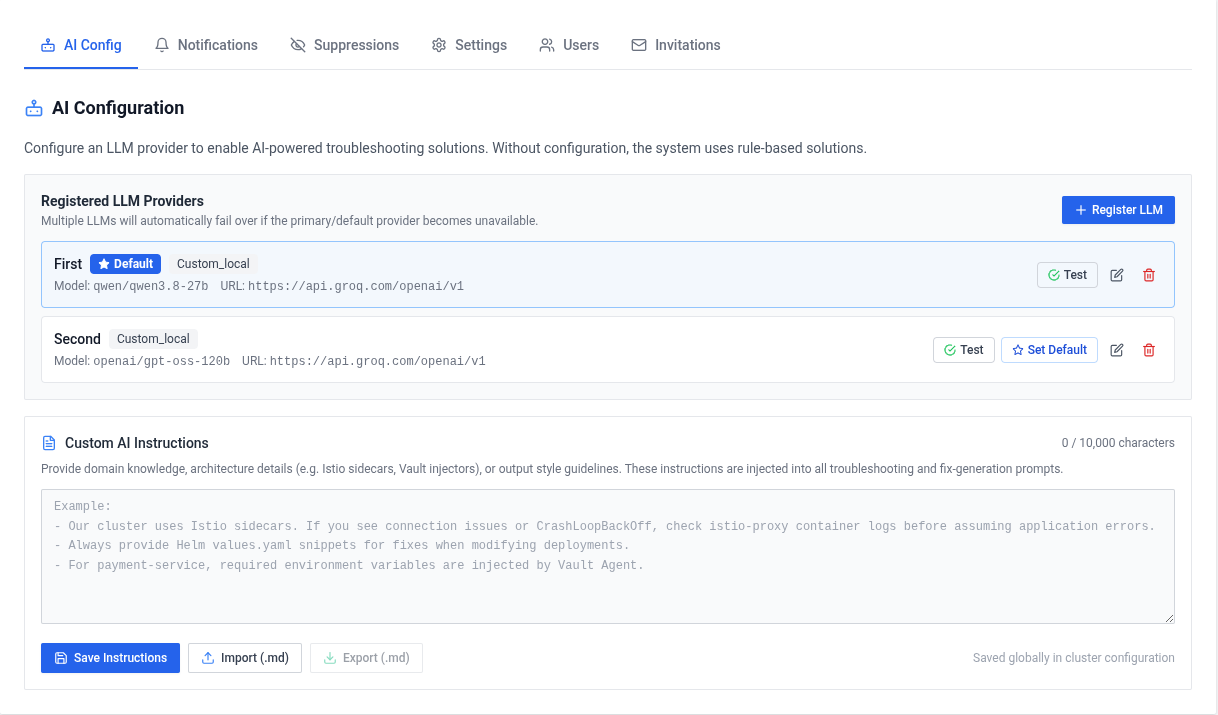
You are not restricted to a single provider. In the Admin Panel, you can add and maintain a pool of configurations:
- Multiple Concurrent Profiles: Register different models with human-readable aliases (for example,
"In-Cluster Ollama (qwen2.5)","GitHub Copilot","Anthropic Production"). - Designated Default: Mark any registered profile as the cluster default. All automated background scans and initial pod failure analyses use this model.
- Automatic Failover: If the primary LLM fails (due to provider timeouts, network partitions, context-window limits, or rate quotas), Kure automatically tries the next registered profile in your pool before falling back to rule-based diagnostics.
- On-Demand Selection in Pod Details: While inspecting a pod failure, engineers can switch providers using the dropdown in the triage view to regenerate advice with a different model.
Adding a Provider Profile
Section titled “Adding a Provider Profile”- Open the dashboard and log in as an administrator.
- Navigate to Admin Panel → AI Configuration.
- Choose a provider type:
- Click Scan Cluster for Local LLMs to detect in-cluster Ollama/vLLM instances, or
- Select GitHub Copilot, Anthropic, Google Gemini, or Custom.
- Enter the Model Name and API Key (if required).
- Click Test Connection to verify endpoint reachability and credentials. Kure immediately registers the verified profile.
- Toggle the Default button if you wish this profile to handle primary cluster triage.
Security & Credential Encryption
Section titled “Security & Credential Encryption”All provider API tokens are encrypted at rest using AES-256 (Fernet symmetric encryption).
- The encryption key is managed by Kubernetes Secret
kure-encryption-key(security.encryptionKeyin Helm values). - If omitted during installation, Helm automatically generates a secure key on first install and preserves it across future Helm upgrades.
- API keys are never exposed in plaintext to the browser; only masked identifiers are displayed in the Admin UI.
Removing or Updating Profiles
Section titled “Removing or Updating Profiles”- To update credentials or switch models, open the profile card in AI Configuration, modify the fields, test, and save.
- To remove an LLM profile, click Delete on its card. If all providers are removed, Kure seamlessly switches to deterministic rule-based analysis.