Custom Instructions
Kure Monitor allows cluster administrators to provide a custom Markdown instruction document that is prepended to every AI prompt generated by the system.
This lets your engineering and SRE teams inject domain knowledge, architectural constraints, and response formatting rules directly into AI diagnoses without touching any application code.
Why Custom Instructions?
Section titled “Why Custom Instructions?”Out of the box, LLMs generate generic Kubernetes advice based on public error patterns. Custom Instructions enable you to align model outputs with how your infrastructure actually runs:
- Service mesh and sidecars: Alert models if Istio, Linkerd, or Envoy sidecars are injected and should be inspected before flagging the application container.
- Secrets and configuration management: Guide models toward your secret store (e.g., HashiCorp Vault Agent Injector or External Secrets Operator) instead of proposing raw Kubernetes Secret edits.
- Deployment workflows: Require that remediation steps specify Helm
values.yamldiffs, Kustomize overlays, or GitOps manifests rather than imperativekubectl editcommands. - Team-specific playbooks: Direct engineers to internal runbooks, escalation matrices, or dedicated observability dashboards (Prometheus/Grafana URLs).
Configuring Custom Instructions
Section titled “Configuring Custom Instructions”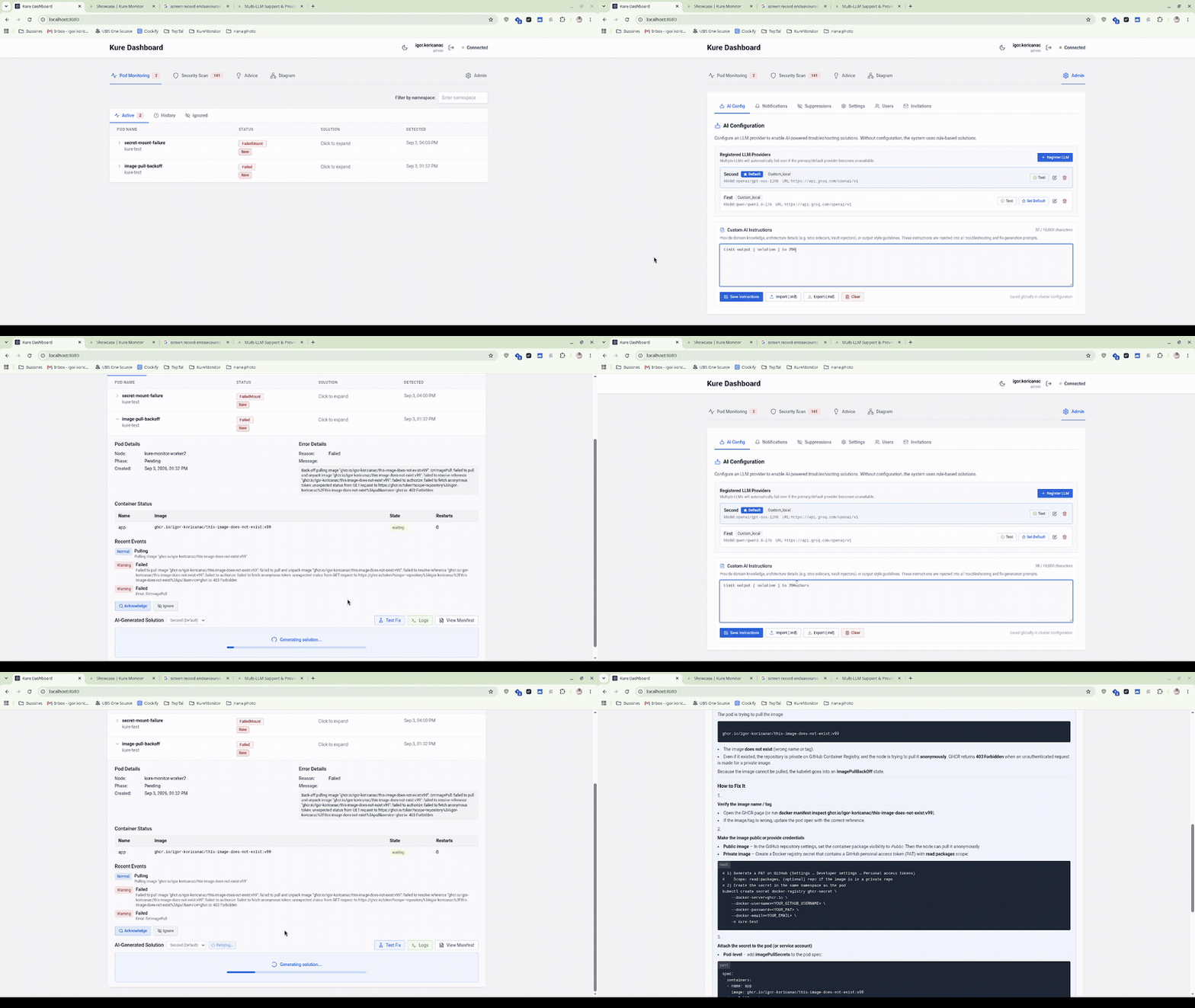
- Navigate to Admin Panel → AI Configuration.
- Scroll to the Custom Instructions editor.
- Type or paste your guidelines in standard Markdown (
.md). - Click Save Instructions.
You can also export your active instructions as an instructions.md file to commit them to version control, or import an existing file directly into the dashboard.
Example Instructions File
Section titled “Example Instructions File”Below is a typical production example:
# Cluster Engineering Standards
## Architecture & Conventions- All services run in an Istio service mesh. When inspecting `CrashLoopBackOff`, always evaluate whether `istio-init` or the `istio-proxy` sidecar container failed first.- We do not mount raw Kubernetes Secrets directly into pods. Secret injection is handled by the Vault Agent sidecar (`vault.hashicorp.com/agent-inject`).- Resource limits must follow our namespace quota guidelines: never propose CPU limits exceeding 4 cores without an HPA review.
## Remediation Formatting- Provide suggested manifest changes as Helm `values.yaml` snippets whenever possible, targeting the `apps-prod` release.- Include a 1-sentence explanation for junior on-call engineers describing why the failure triggered.- If the issue is related to storage (`FailedMount`, `CrashLoopBackOff` on write), remind the operator to check PersistentVolumeClaim IOPS limits.
How It Works Under the Hood
Section titled “How It Works Under the Hood”When an engineer inspects a failing pod, tests a mirror workload, or audits an AI Advice finding, Kure Monitor merges the system prompt, your custom Markdown block, and the real-time Kubernetes telemetry (events, container exit codes, termination logs, and resource metrics):
You are a Kubernetes expert helping to diagnose and fix pod failures.
--- Custom Instructions (provided by cluster admin) ---[Your markdown instructions here]--- End Custom Instructions ---
Pod Failure Details:- Namespace: production- Pod: checkout-api-7b89f5d6-8m2qx- Failure Reason: CrashLoopBackOff (Exit Code 137)...
Custom instructions persist in your cluster’s PostgreSQL database and are applied across all registered LLM profiles.