
Multi-LLM Support & Provider Profiles
Kure Monitor allows cluster administrators to configure a pool of multiple AI providers simultaneously — such as local in-cluster Ollama or vLLM instances alongside Anthropic Claude, OpenAI, and GitHub Copilot.
Instead of locking the entire cluster to a single API key or endpoint, Multi-LLM Support provides automatic failover resilience and allows on-call engineers to choose their preferred model during live incident troubleshooting.
Overview & Architecture
Section titled “Overview & Architecture”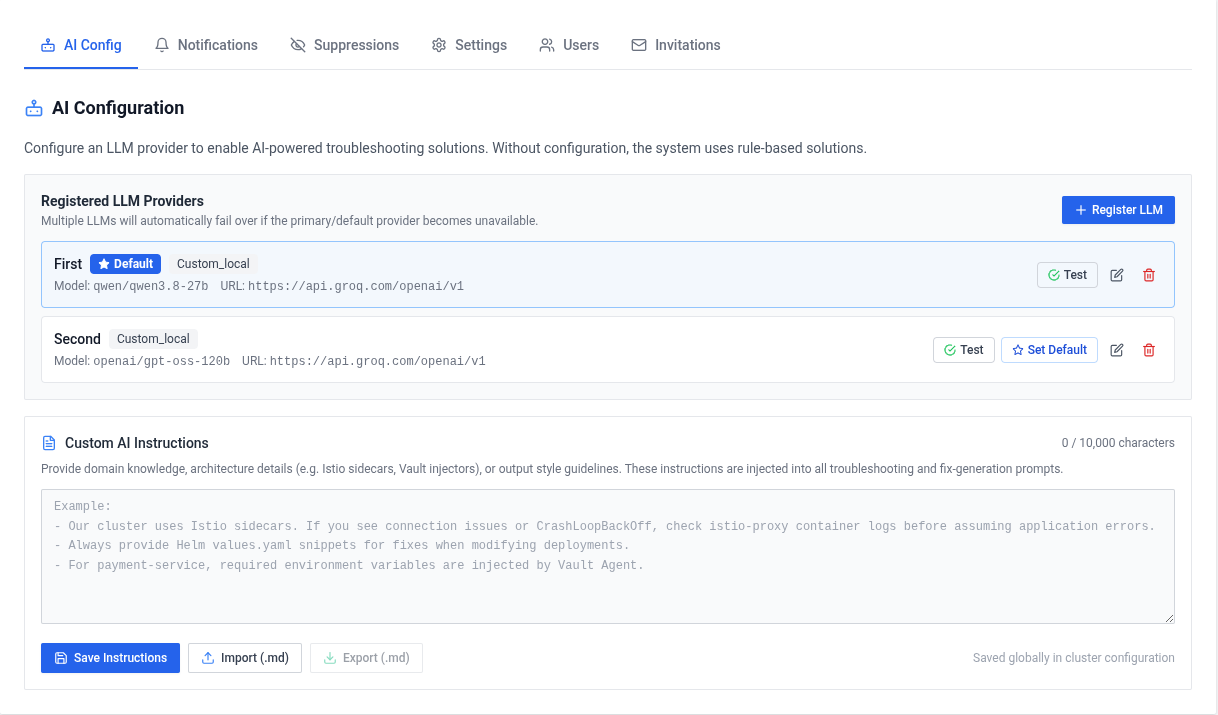
With Multi-LLM Support, the solution engine maintains an active pool of registered models:
- Simultaneous Provider Profiles: Add profiles with human-readable aliases (for example,
"Cluster Ollama (qwen2.5)","Production Claude Sonnet","GitHub Copilot"). - Designated Default: Mark one profile as the primary cluster default. All automated background scans and initial failure analyses use this model.
- Automatic Provider Failover: If the default provider fails due to network partitions, provider timeouts, context-length limits, or token rate limits, Kure automatically tries the next active provider in the chain before falling back to rule-based diagnostics.
- On-Demand Selection During Triage: While inspecting a pod failure in the dashboard, engineers can switch between registered models directly in the pod triage view to regenerate advice and manifest fixes.
Supported Provider Types
Section titled “Supported Provider Types”Kure Monitor connects to both local cluster workloads and external cloud providers:
- Local AI Auto-Detect: Scans internal Kubernetes namespaces for inference services like Ollama, vLLM, LocalAI, TGI, or NVIDIA NIM, auto-discovering service endpoints and available loaded models.
- GitHub Copilot / Models: Inference via
models.github.ai/inferencesupporting OpenAI and partner models. - Anthropic: Direct support for Claude models (
claude-3-5-sonnet,claude-3-7-sonnet, etc.). - Google Gemini: Gemini Pro and Flash models.
- Custom (OpenAI-compatible): Connects to OpenAI, Groq, DeepSeek, Mistral, Together AI, or private inference gateways.
Managing Provider Profiles
Section titled “Managing Provider Profiles”- Navigate to Admin Panel → AI Configuration.
- Click Add Provider or run cluster auto-detection.
- Enter the Name, select the Provider Type, and supply the model identifier and credentials.
- Click Test Connection — Kure validates endpoint connectivity and registers the profile.
- Set the active default by toggling the Default badge on your preferred provider.
API tokens are encrypted at rest using AES-256 (Fernet symmetric encryption) using the cluster’s preserved encryption Secret.
Related Features
Section titled “Related Features”- Custom Instructions: Prepend cluster runbooks and team conventions to every prompt across all providers.
- Pod Monitoring: Real-time pod failure triage and AI root-cause analysis.
- LLM Configuration: Detailed setup parameters and provider endpoints.
Love Kure Monitor?Support us on GitHub
Star